Introduction to GenAI-Logic
Introduction: Governed Systems From Requirements
 TL;DR - Requirements In, Enterprise-class Governed System Out
GenAI-Logic turns your requirements into enterprise-class database transaction systems, governed by no-bypass rules.
It works with the methodology and tools you already have — nothing new to adopt. And shared artifacts foster collaboration between Business Users and Developers.
- Familiar — use your existing methodology: the same governed rules come out either way, across the whole portfolio.
- Readable — AI generates rules, not code: the same requirement handed to a general coding assistant as a procedural task produces code that looks right and hides bugs — vs. five rules you can actually read.
- Trustable — governance is no bypass: enforced the same way regardless of source.
- Reviewable — AI flags what needs judgment: AI writes back a proactive audit trail (
ad-libs.md) — you review a short list, not the full diff. - Shared — fits your organization: Business Users and Developers work the same project, with standard tools and artifacts — no hand-off, no rewrite.
- Standard — spans design to runtime: build with your own IDE and git; run as scalable containers, reachable by API, MCP, and messages.
Standard tools and methodologies. Governed rules you can read, trust, and maintain.
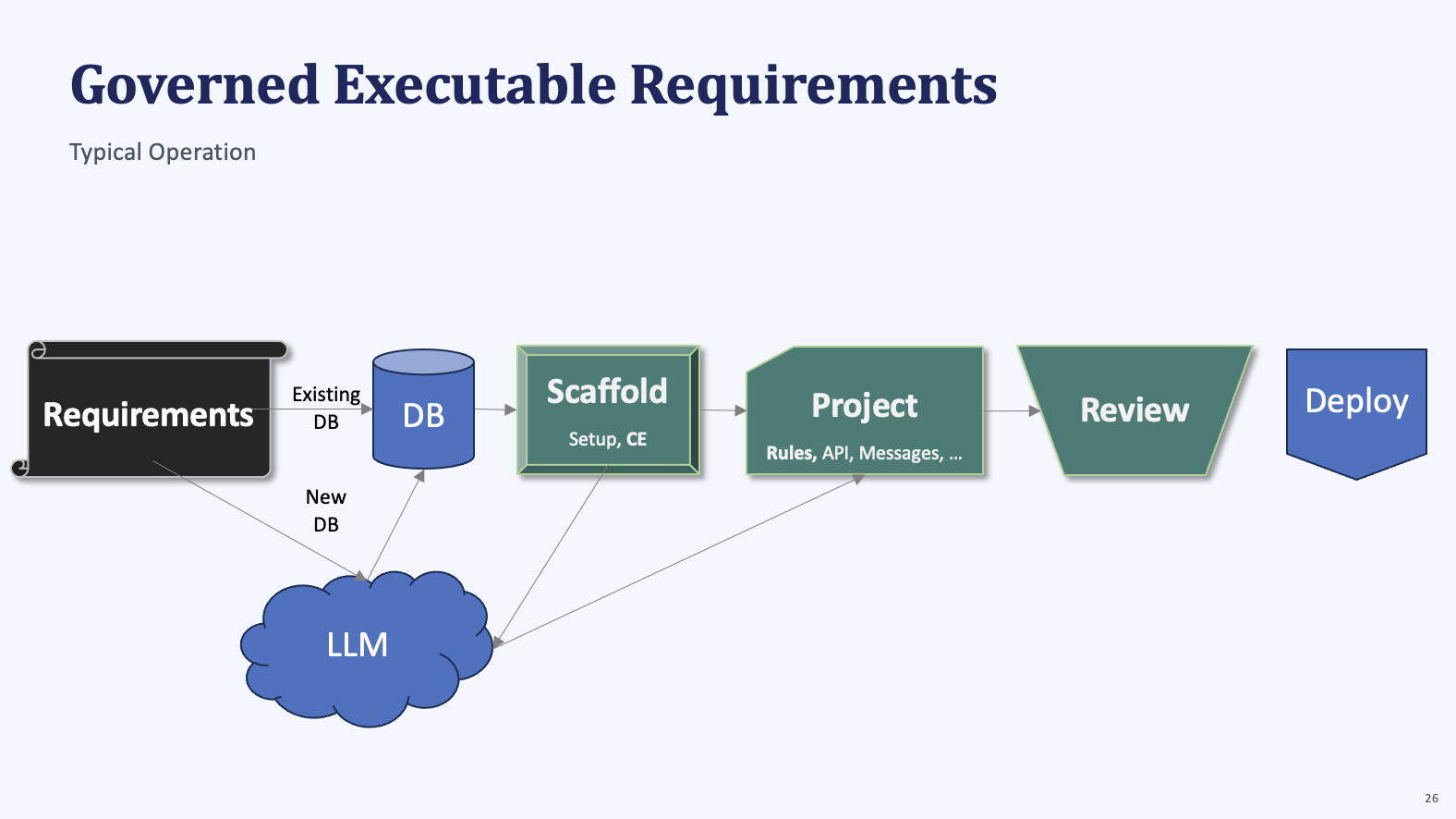
Requirements - as you do now
Write requirements the way you already do — nothing new to learn, nothing to migrate. AI converts whatever format you use into the same governed, no-bypass rules.
Example: paste these requirements into your AI Assistant
Create basic_demo from samples/dbs/basic_demo.sqlite.

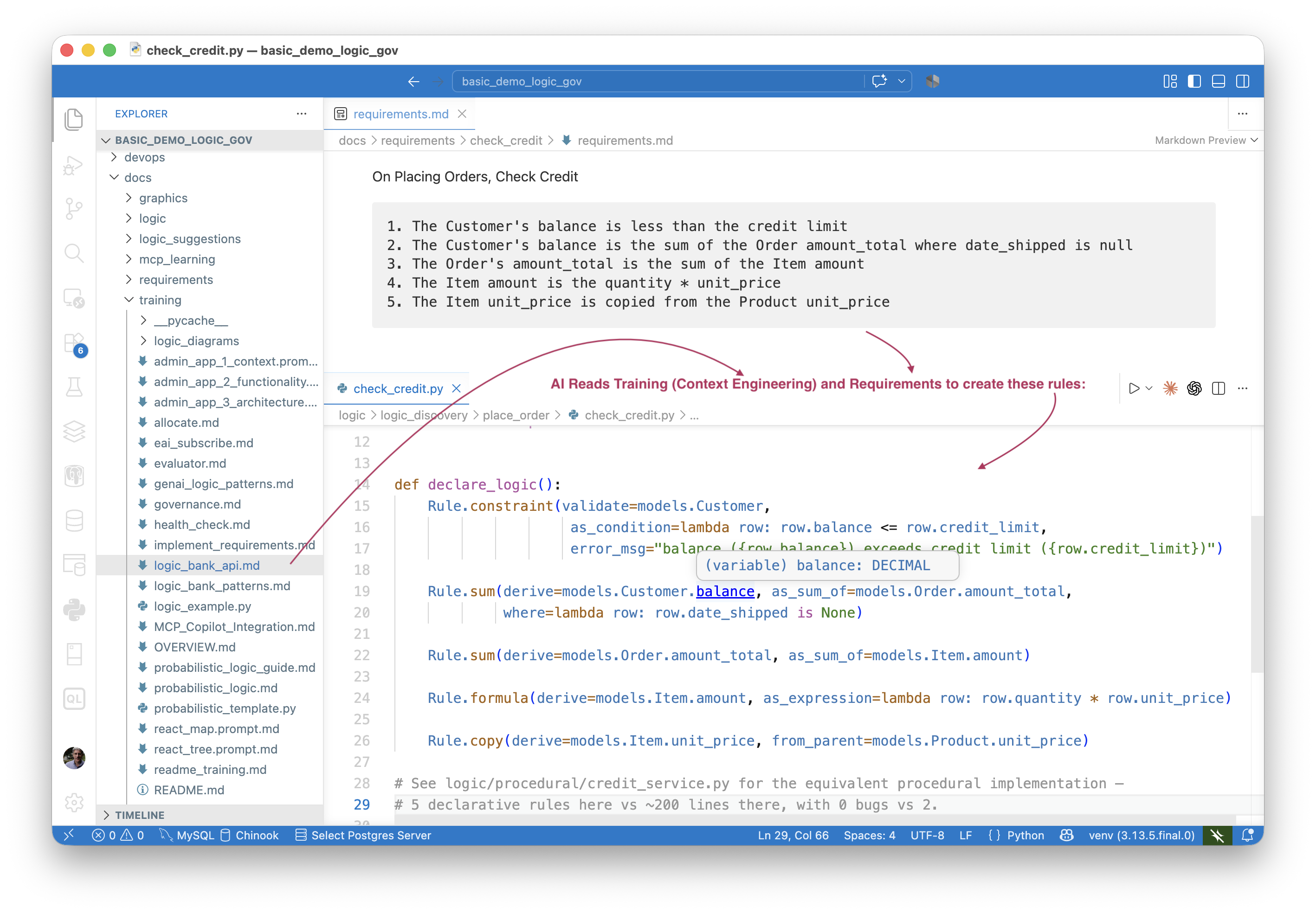
On Placing Orders, Check Credit:
    1. The Customer's balance is less than the credit limit
    2. The Customer's balance is the sum of the Order amount_total where date_shipped is null
    3. The Order's amount_total is the sum of the Item amount
    4. The Item amount is the quantity * unit_price
    5. The Item unit_price is copied from the Product unit_price

Use case: App Integration
    1. Publish the Order to Kafka topic 'order_shipping' when the date_shipped is not None.
Incomplete is fine too — provide what you have and request an interview; AI asks what's missing, and drafts the requirement from your answers.
Enterprise Scale, With Regulations
Enterprise-class systems are supported too — a set of requirements, including (for example) custom message formats, expressed by example. This cascade-allocation prompt — GL accounts, funding splits, and AI Rules fuzzy-matching contractor charges to the right project — is governed the same way as the credit-check example above, at enterprise scale. The traditional, hand-coded version of this same logic took 4 developers × 2 years to build and keep governed:
Departments own a series of General Ledger Accounts.

Departments also own Department Charge Definitions — each defines what percent
of an allocated cost flows to each of the Department's GL Accounts.
An active Department Charge Definition must cover exactly 100% (derived:
total_percent = sum of lines; is_active = 1 when total_percent == 100).

Project Funding Definitions define which Departments fund a designated percent
of a Project's costs, and which Department Charge Definition each Department
applies. An active Project Funding Definition must cover exactly 100% (derived:
total_percent = sum of lines; is_active = 1 when total_percent == 100).

Projects are assigned to a Project Funding Definition.

When a Charge is received against a Project, cascade-allocate it in two levels:
  Level 1 — allocate the Charge amount to each Department per their
             Project Funding Line percent → creates ChargeDeptAllocation rows
  Level 2 — allocate each ChargeDeptAllocation amount to that Department's
             GL Accounts per their Charge Definition line percents
             → creates ChargeGlAllocation rows

Constraint: a Charge may only be posted if the Project's
Project Funding Definition is active.

Charges can be placed by contractors.  They may supply only a minimal project description to identify the Project - use AI Rules to find an Active Project based on a fuzzy match to project name, and past charges from the contractor.  For example, you might observe that a contractor works on roads vs construction.

Total the charges into the Project and GL Account.
This example illustrates creating a project, with regulations.
A Business-User-Friendly IDE
The same example, built with a simplified IDE suitable for Business Users — the full project remains available to developers using the standard UI:
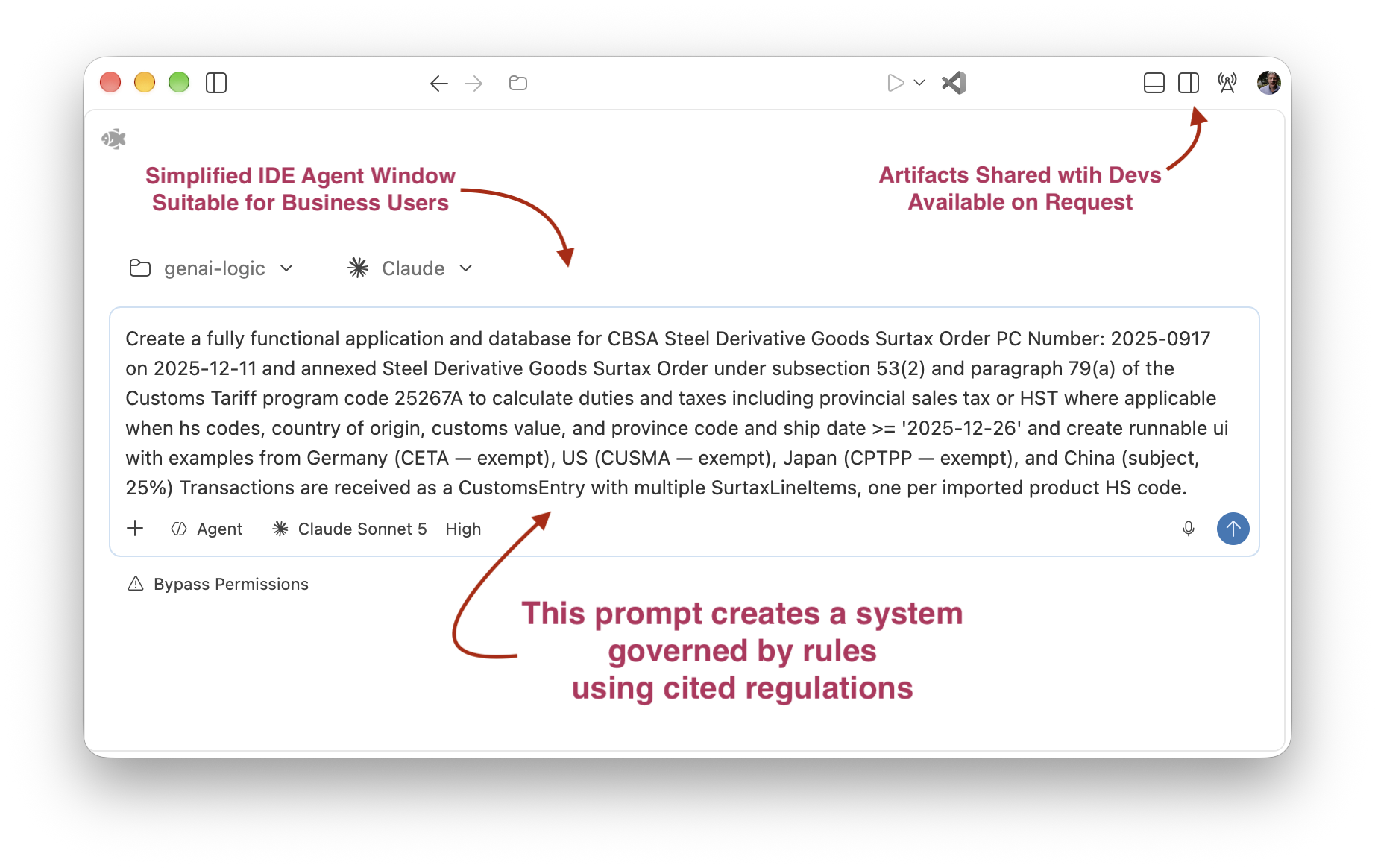
See screens, data model, and more for this example: Cost Allocation. Two more enterprise-scale examples, same pattern: Customs CLVS and Customs Surtax.
Formats, the RFI interview, and real transcripts: Executable Reqmts. Enterprise samples — worth a skim, each with its own TL;DR, diagrams, and real code: Cost Allocation, Customs CLVS, Customs Surtax
Existing DB, or New DB
Point at an existing database and it's used as-is — no migration, no re-modeling. Or describe a new one in your requirements text and AI creates it. Either way, the requirement text and the database are the two starting materials the rest of the pipeline is built from.
Walkthroughs: Create - Existing DB.
Scaffold (+ Context Eng)
AI sets up the project and installs Context Engineering — training material embedded in the project itself that steers every later generation step toward declarative rules instead of hard-to-read procedural code.
What gets installed and why: AI-Enabled Projects.
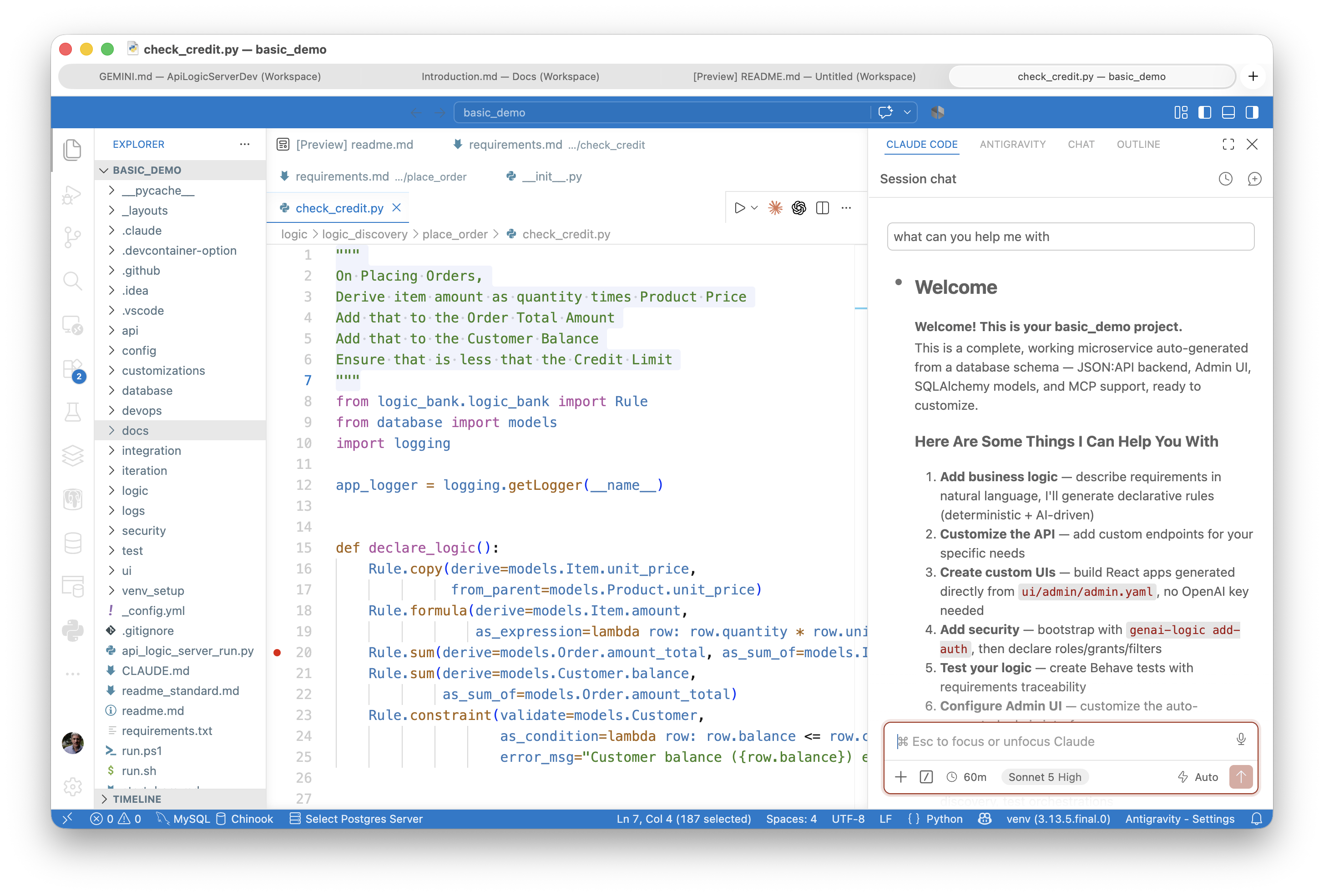
Guidance, Without the Walls
Classic studios solved "where do I start" with walls — a fixed palette, a proprietary format, "the tool's way" of thinking. AI alone hands you a clean sheet of paper instead — no walls, but also nothing to push against when you want a little guidance.
Context Engineering is the guidance, without the walls — just enough, when you want it, in this project's own vocabulary.
Just enough guidance — a menu of real next steps, not a forced curriculum
Product depth on tap — a real answer, not a canned one-liner, with follow-up discussion
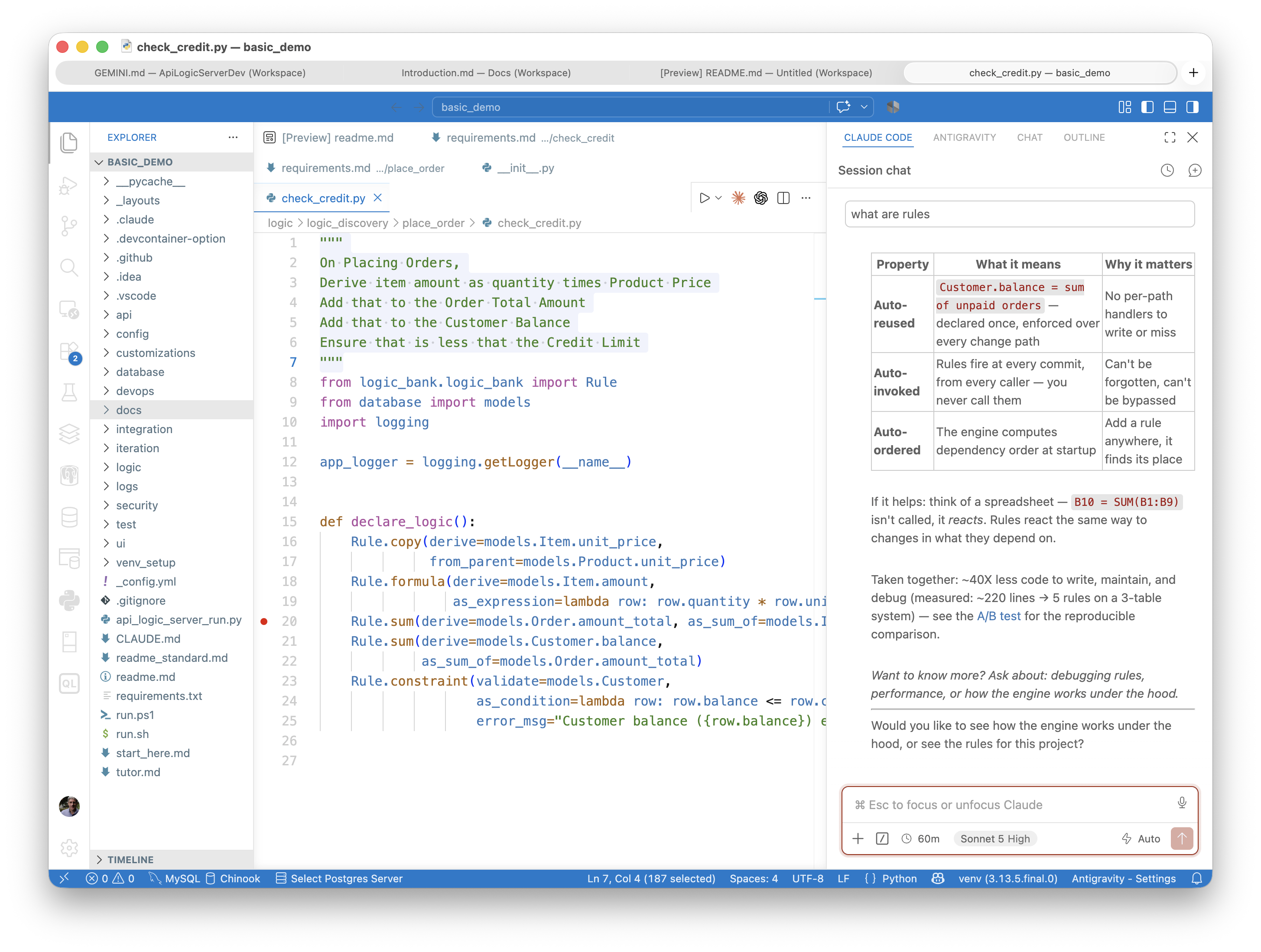
Nothing proprietary underneath — still git, still standard Python, still a rule engine you can read. The guidance lives in the conversation, not in the output format.
Why this doesn't become its own wall, and what "enterprise-aware" system knowledge actually means: AI, You're in Control.
Standard Project - Executable
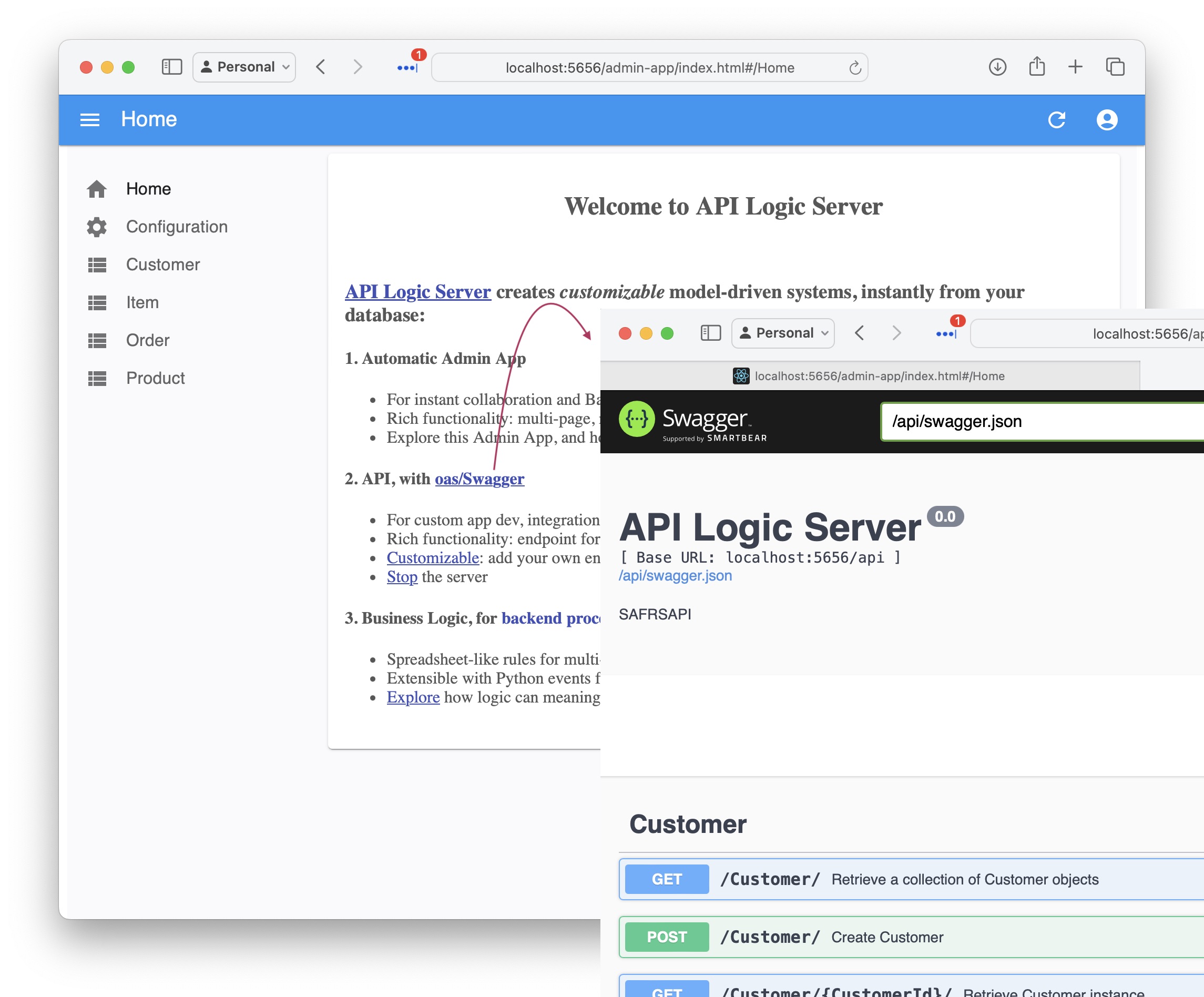
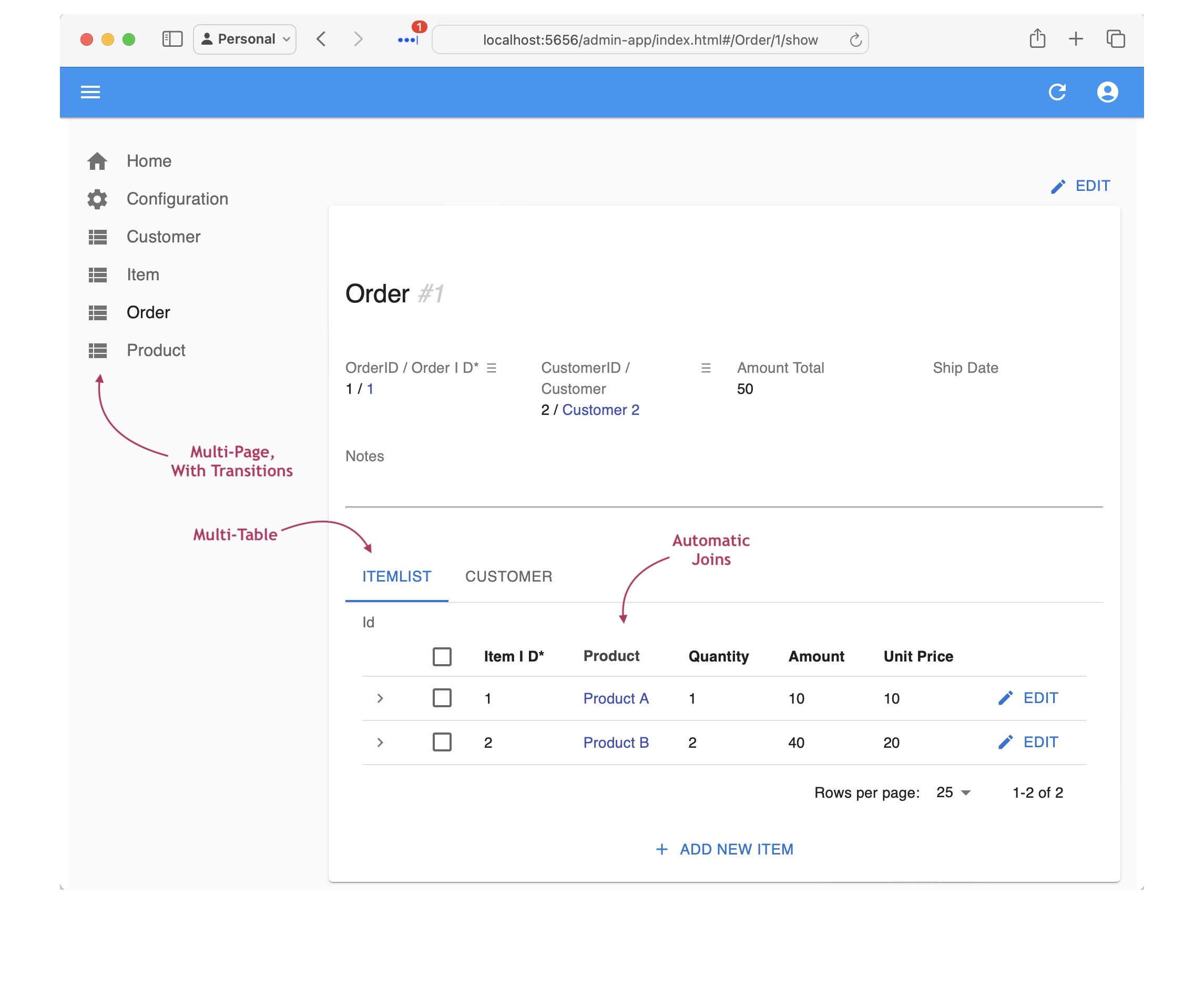
AI generates an executable project: rules, API, Admin App and message handlers. Open it in your IDE, and run it.
See the Create Project, Governing Rules
See the API
See the Admin App
Governance Infrastructure
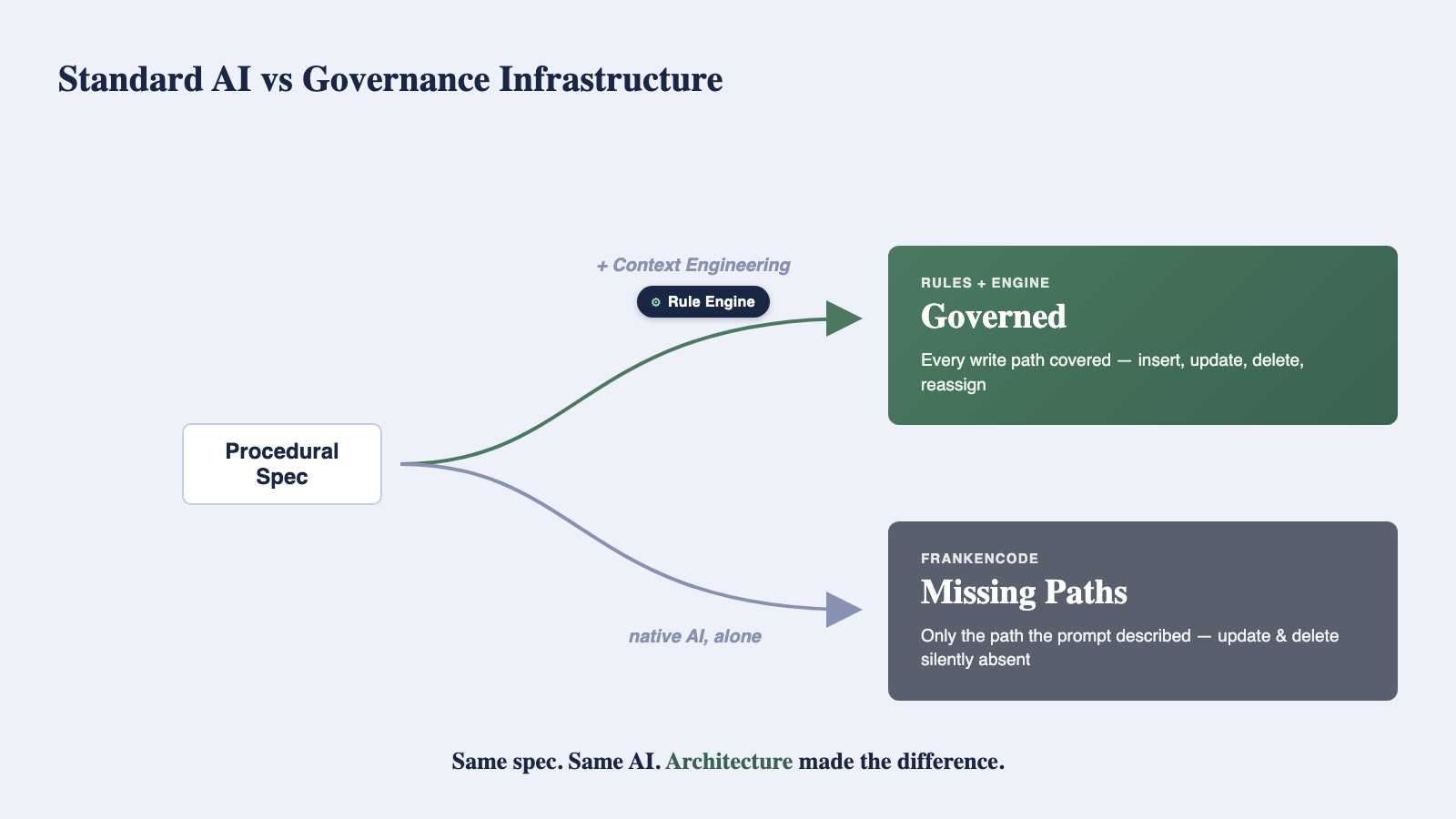
Context Engineering and the rule engine are the governance infrastructure — one governs design time, the other runtime:
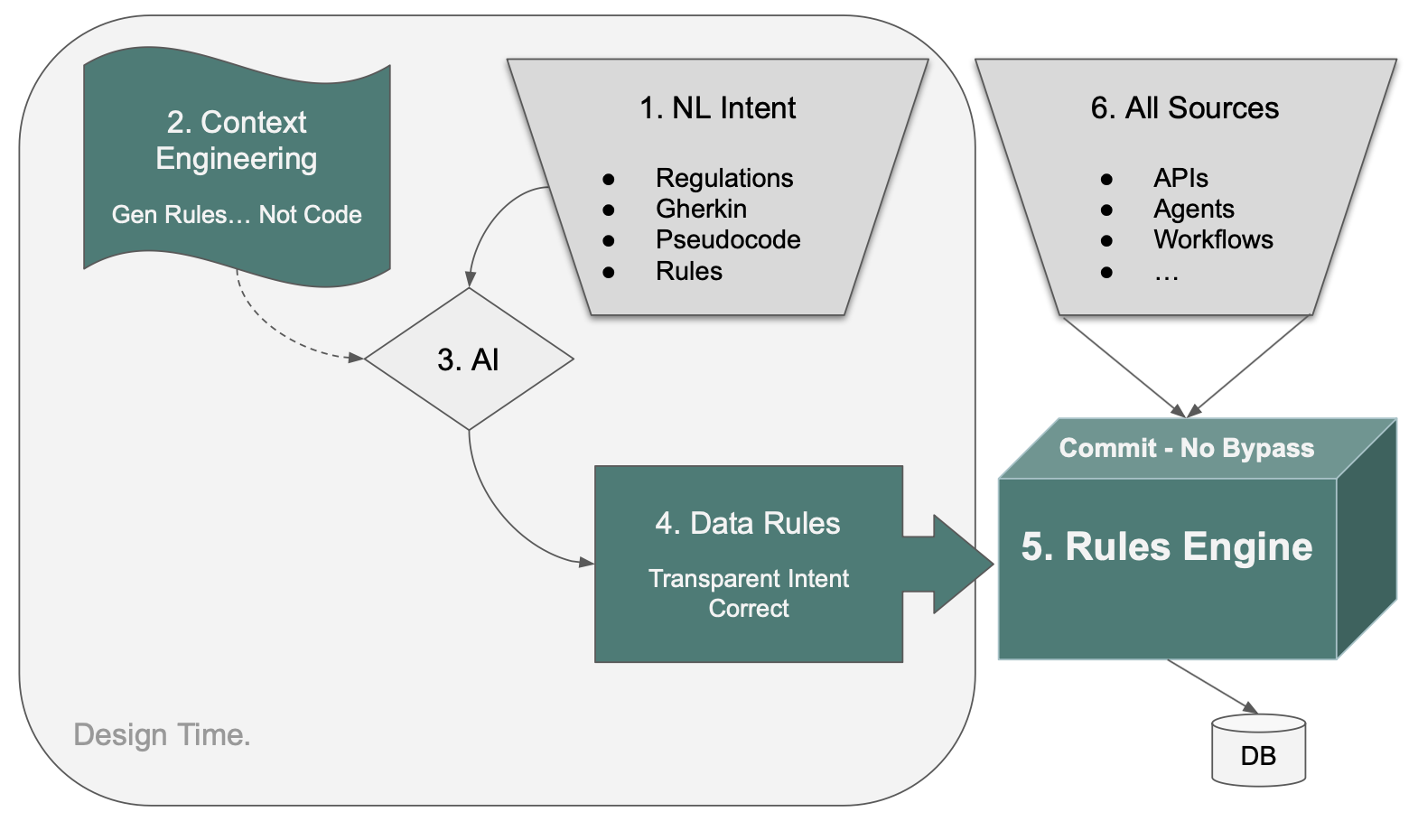
Design time: whatever form the requirement takes — regulation, Gherkin, prose, procedural — Context Engineering steers AI to compile it into rules. Without it, native AI writes path-oriented code instead: the insert path works, update and delete silently don't (see our experiment).
Runtime: every write — API, agent, message, script — passes through the same commit point, where the rules fire.
See the contrast: with Context Engineering, vs. without
Why Python-as-declaration works this way, across rules, API, and UI: Model Driven.
Governance Across the Portfolio
One Project to a Portfolio
The rule engine ensures a project's rules are always followed — no bypass, all sources and paths.
The design-time funnel is what takes that same guarantee from one project to the entire portfolio — without changing how your team works.
Readable rules are one shared artifact, not two — business and developer read the same file and agree it says what it should. No spec drifting from its implementation.
The experiment shows the mechanism holds on one spec, tested directly against native AI. The enterprise samples show it holds across different inputs — a cascade-allocation spec, an XML/Kafka pipeline, a regulatory citation — each arriving at the same governed shape, without any of those teams first learning to write requirements differently: Cost Allocation, Customs CLVS, Customs Surtax.
Review - Rules Governance
The rules are executable the moment they're generated — the infrastructure above enforces them automatically. Review adds the human layer on top: a 3-step process for human in the loop governance of your business logic:
-
Read: unlike native AI which generates ~200 lines of code you'd rather not read, the 5 check credit requirements generate 5 rules you can read — 40X less to read, trust, and maintain.
-
Trust: AI-generated code is not only lengthy, we have observed bugs (for more information, click here). Rules are declarative, so address all paths (insert, update, delete), and operate as listeners to ORM commit events, so apply to all transaction sources. AI itself is never used at runtime unless you explicitly request it — and even then, its proposals (say, an optimal supplier) are still checked against your rules.
-
Maintain: the rules engine orders rules execution by analyzing dependencies, so it automatically adapts to changing rules — the same comparison shows this is what lets the five rules handle the re-parenting cases the procedural version got wrong. It's also purpose-built for high-volume transaction processing, chaining rules across tables: unlike a RETE engine, which has no notion of old/new values, it uses those values to prune rules and avoid N+1 queries — an item's price change updates the order total with a single row update, not a series of them.
Full architecture and the runtime opt-in pattern: Logic and AI Security FAQ. Audit-trail mechanics: Executable Reqmts.
Deploy - Standard Container
The result runs as a scalable server exposing both the API and message handlers, built on the same rule engine and the same governance — no separate deployment step re-checks or re-implements the rules.
Iterate, Vibe Custom UIs
Most teams now build their UI with a Vibe tool, not by hand. Vibe tools are frontend-only — they still need real infrastructure underneath: a governed API with rules behind it, not a mock. This project already is that infrastructure, ready to point a Vibe tool at.
You can add requirements, and update existing ones, in place. Use your favorite Vibe tools to create custom User interfaces against this API. Use your IDE as always for coding, debugging, etc. Ask AI to create tests, and add your own.
See vibe. Testing. The Manager is where you run all of this day to day.