.. EAI
 TL;DR - Kafka Integration: Async Messaging
APIs are useful to application integration, but do not deal with the reality that the receiving system might be down.
Message Brokers like Kafka address this with guaranteed async delivery of messages. The Broker stores the message, delivering it (possibly later) when the the receiver is up.
Message Brokers also support multi-cast: you publish a message to a "topic", and other systems subscribe. This is often casually described as "pub/sub".
This sample presumes you are familiar with basic GenAI-Logic services, as illustrated in the Basic Demo tutorial.
This is the same system used in Executable Requirements, which focuses on how these prompts serve as the living spec — readable by business and IT, executable by AI.
Overview
This app illustrates using IntegrationServices for B2B push-style integrations with APIs, and internal integration with messages.
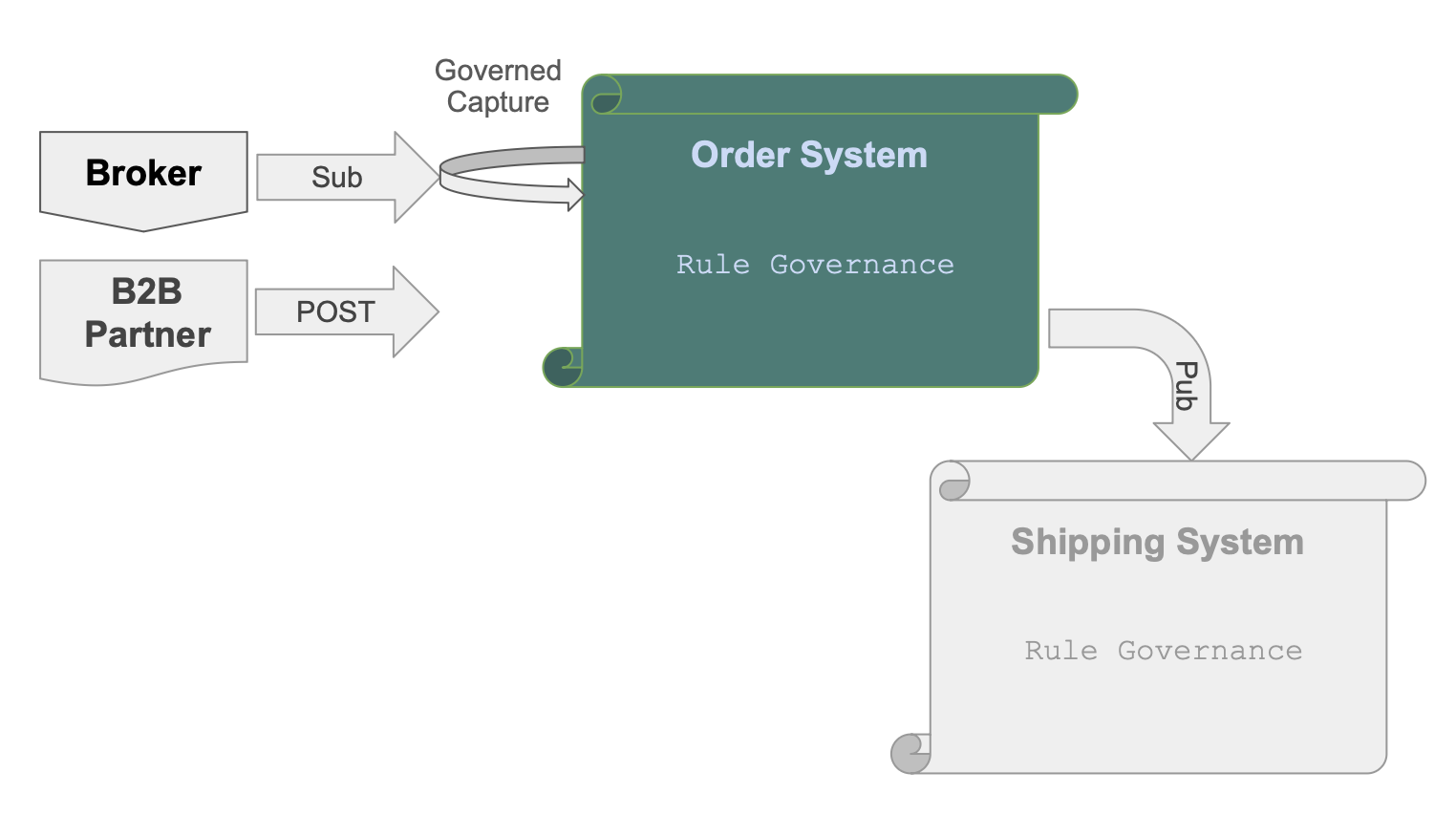
basic_demo_eai is a single API Logic Server providing APIs and logic — it both subscribes and publishes, so there's no second project to stand up:
-
Order Logic: enforcing database integrity (Check Credit) and application integration (notify shipping)
-
A Custom API (
OrderB2B), matching an agreed-upon format for B2B partners -
Kafka Subscribe: listens on topic
order_b2bfor inbound orders from a message broker -
Kafka Publish: publishes to topic
order_shippingwhen an order ships — consumed by whatever downstream shipping system you plug in (not part of this demo) -
Standard APIs for ad-hoc integration, user interfaces, etc
Setup
No Kafka installed? No Docker? Not required for any of this. The Kafka client
library installs with the project either way; you only need an actual broker
running if you want to see live message delivery (Section 6, Step 6 — optional).
Everything else — building, running, Check Credit, the Custom API, and even the
Kafka Subscribe/Publish logic itself — works and is fully testable without one.
If/when you do want live Kafka, the project includes everything to stand one up —
see integration/kafka/kafka_readme.md's Live Kafka Test section
(docker compose -f integration/kafka/dockercompose_start_kafka.yml up -d, Podman
alternative included).
Just want to run it, skip building? The Manager already has a pre-built
basic_demo_eai — jump straight to Section 1, Run and Verify.
Everyone — whether you just built it or you're using the pre-built copy — starts
there.
Build It
One command creates the project; one command executes every requirement below (Check Credit, B2B API, Kafka Subscribe, Kafka Publish, Security) — this is the entire build, not the first of several steps:
Please load `.github/.copilot-instructions.md`
Important: be sure CoPilot is in "Agent" Mode. "Ask" will not work. Also, we get consistently good results with
Claude Sonnet 4.6.
# A - Create project from existing database
genai-logic create --project_name=demo_eai --db_url=sqlite:///samples/dbs/basic_demo.sqlite

# B - In created project, get these requirements
$ cp -r ../samples/requirements/demo_eai/ .

# C - Optionally, configure security
$ (cd devops/keycloak; docker compose up -d)
$ genai-logic add-auth --provider-type=keycloak --db-url=localhost

# D - Create system from requirements
implement requirements docs/requirements/demo_eai
Using Podman instead of Docker? Step C's docker compose up -d can be podman compose up -d
instead — devops/keycloak/docker-compose.yml works unchanged. One-time setup: see
DevOps-Podman.
The full requirements spec that step D executes is docs/requirements/demo_eai/requirements.md — 5 Gherkin features. Sections 2-5b and 7 below are a tour of what that one command built — each maps back to the requirement that produced it. They are not additional steps to run.
This is a real project: your IDE, your Python, your source control. The prompt creates it in minutes — but you own it fully and iterate from there. Change a rule; the engine determines execution order automatically. Add an endpoint; the rules are already there waiting for it.
This suggests a different way to think about requirements gathering. Instead of Word documents that describe a system and then drift from it, requirements can be structured prompts — precise enough for AI to execute, readable enough for business and IT to agree on. The spec and the running system are the same artifact.
1. Run and Verify
- Start the Server: F5 (or
python api_logic_server_run.py) - Start the Admin App: browse to http://localhost:5656/. The Admin App screen shown below should appear in your Browser.
- Verify as shown below
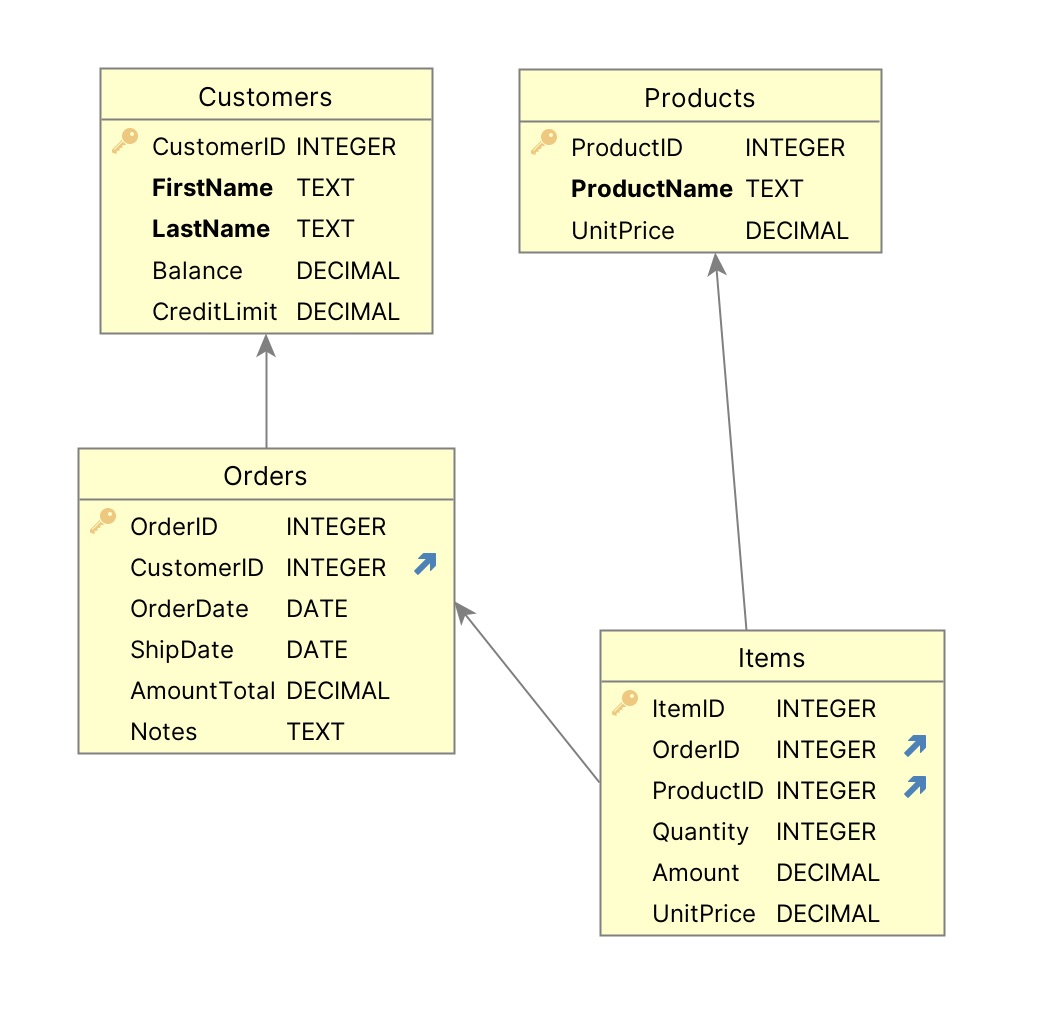
Your project includes a data model diagram
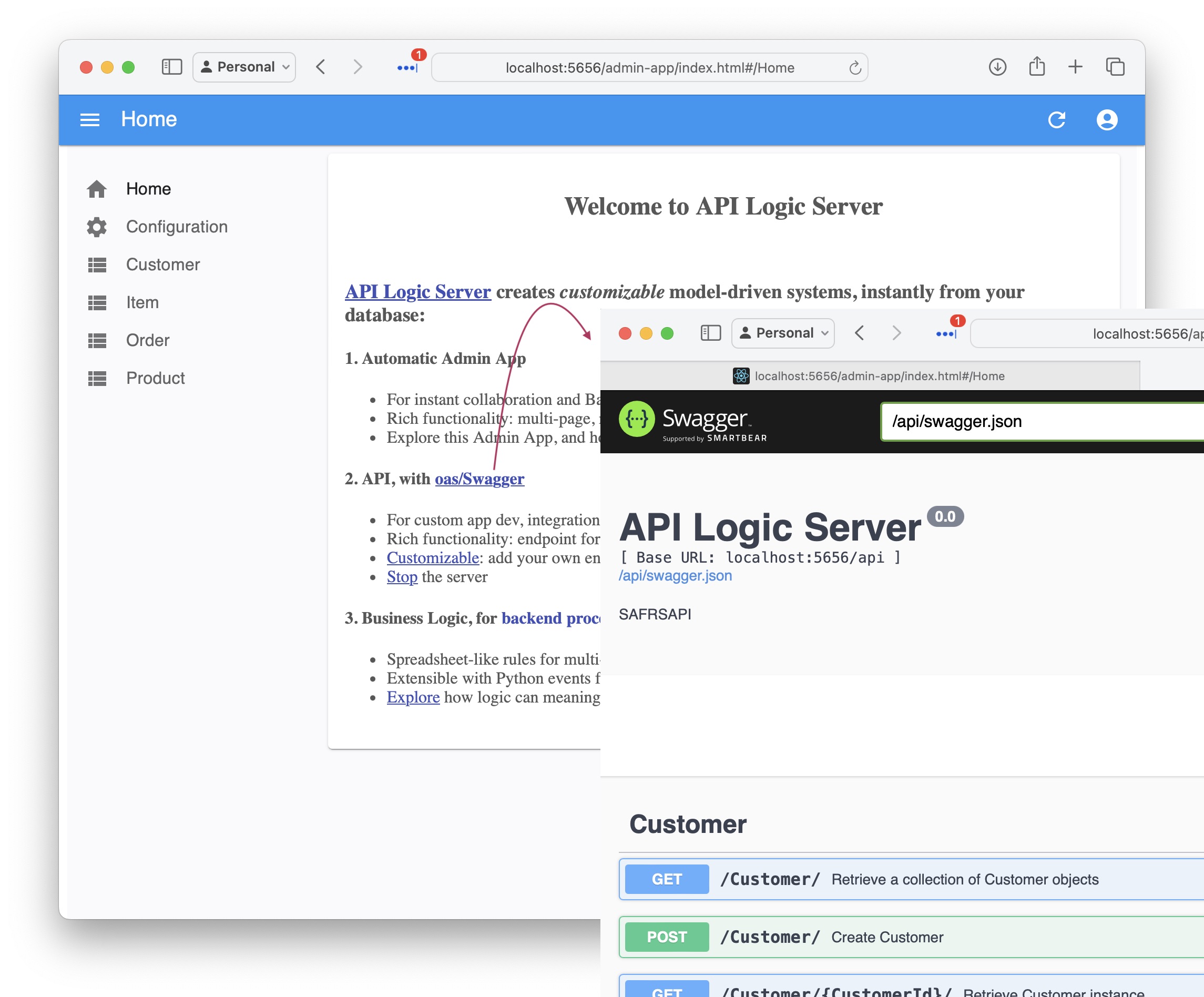
API: filtering, sorting, pagination, optimistic locking,related data access... see Swagger
Your API is MCP enabled, and ready for custom app dev. For more information, click here.
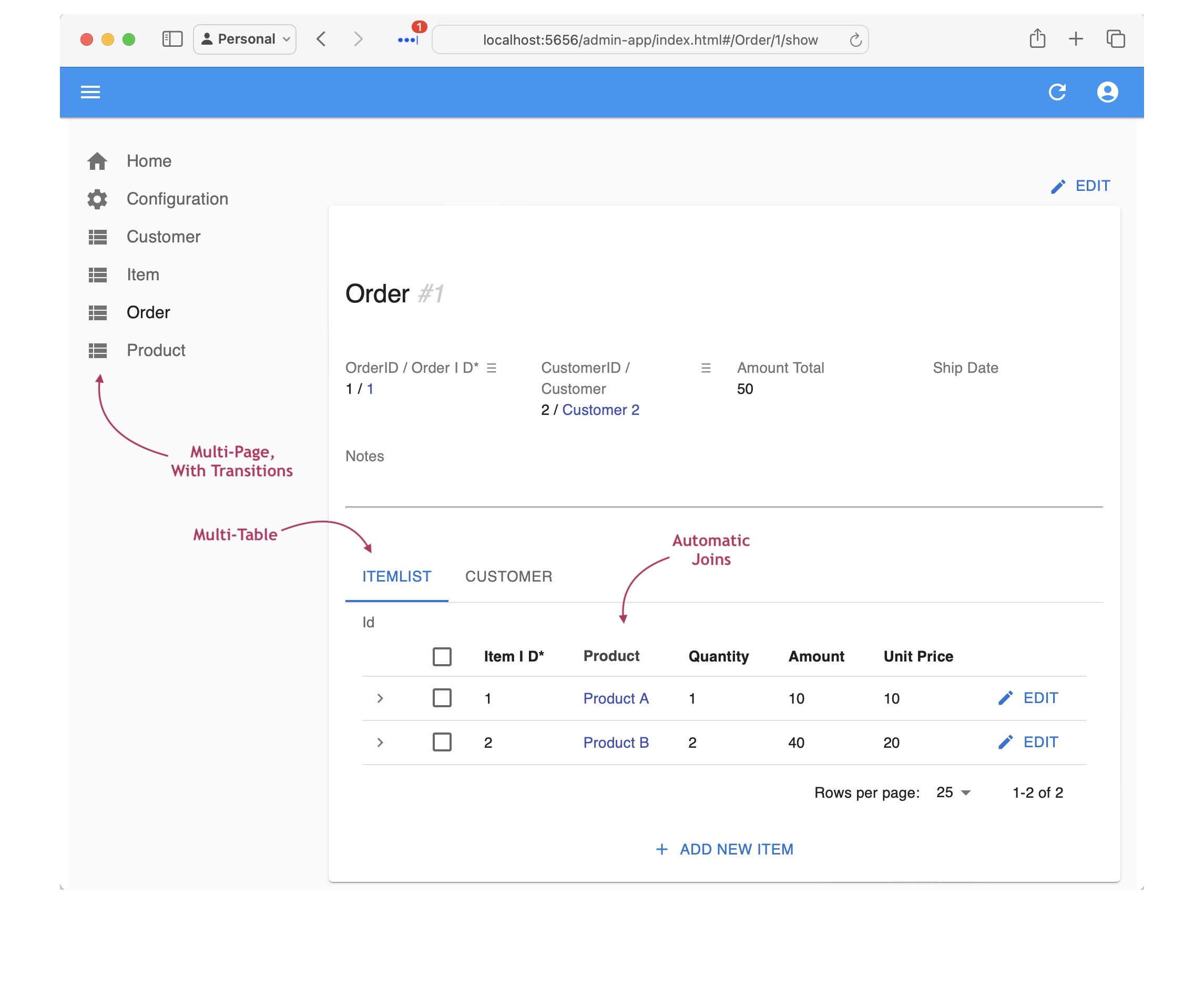
Admin App: multi-page, multi-table, automatic joins, lookups, cascade add - collaboration-ready
For more information, click here.
The Admin App is ready for business user agile collaboration, and back office data maintenance. This complements custom UIs created with the API.
Explore the app - click Customer Alice, and see their Orders, and Items.
Now go to Section 6, How to Test to exercise the EAI features (Check Credit, Kafka Subscribe, Kafka Publish) — or continue reading below for a tour of how each requirement became the running system you just verified.
2. Requirement §1 — Check Credit Logic
Logic (multi-table derivations and constraints) is a significant portion of a system, typically nearly half. GenAI-Logic provides spreadsheet-like rules that dramatically simplify and accelerate logic development.
implement requirements turned this Gherkin feature (requirements.md §1) into the 5 rules below — no procedural code to write or maintain:
On Placing Orders, Check Credit
    1. The Customer's balance is less than the credit limit
    2. The Customer's balance is the sum of the Order amount_total where date_shipped is null
    3. The Order's amount_total is the sum of the Item amount
    4. The Item amount is the quantity * unit_price
    5. The Item unit_price is copied from the Product unit_price

Use case: App Integration
    1. Send the Order to Kafka topic 'order_shipping' if the date_shipped is not None.
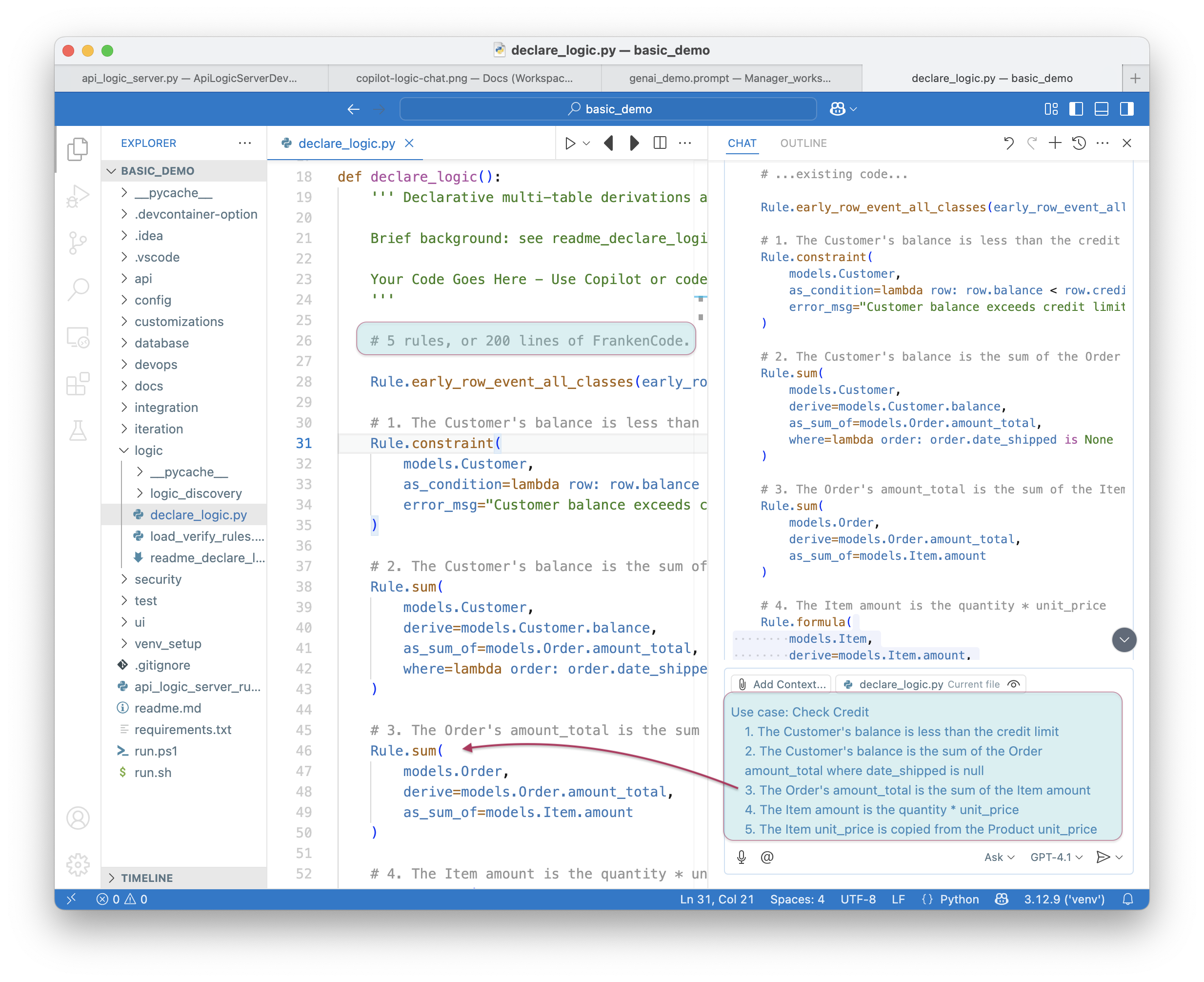
These rules are declared once, on the data — not once per entry point. LogicBank hooks the database commit itself, so Check Credit fires on every write path that touches an Order or Item: the Admin App, the standard JSON:API, the
OrderB2Bcustom API (Section 4), and the Kafka subscriber (Section 5) — all four call the same rules, automatically. Nothing downstream has to (or even can) re-request "enforce Check Credit here too" — that's not a phrase you'll find in this project's requirements.md.
3. Message Formats — Already Included
AI generates integrations by example — provide a sample message shape and it auto-maps obvious field names silently, lists exceptions you specify, and blocks server start on anything unresolvable. They double as test fixtures.
implement requirements already produced these in integration/kafka/message_formats/
(referenced by requirements.md §2-4):
order_b2b.json— inbound B2B order formatorder_shipping.json— outbound shipping notification format
See Integration EAI for how AI uses these.
Tip — mappings belong here too. If you have complex or non-obvious field mappings, save them alongside the format file — in any structure that's clear to you and AI: a CSV, a plain-text table, extra comments in the JSON. AI will read whatever you reference in the prompt. Keeping mappings here (rather than embedded in the prompt) means they're versioned, reusable, and self-documenting.
4. Requirement §2 — Custom API for B2B Orders
To fit our system into the Value Chain, requirements.md §2 asked for a Custom API
to accept orders from B2B partners. implement requirements built the endpoint below
from this Gherkin feature:
Feature: B2B Order Integration

  Scenario: Accept order from external partner
    Given an inbound B2B order in partner format (message_formats/order_b2b.json)
    When the order is received via a Custom API endpoint named OrderB2B
    Then map Account to Customer by name
    And map Items.Name to Product by name
    And map Items.QuantityOrdered to Item.quantity
Result: POST /api/OrderB2B — see Section 6 to test it. Note there's no clause here
about enforcing Check Credit — see Section 2's callout for why not.
5. Requirement §3 — EAI Subscribe (Inbound Kafka Message)
requirements.md §3 asked for the same B2B order shape, but arriving via Kafka instead of a direct API call — reusing the message format from Section 3:
Feature: Kafka Subscribe Order Integration

  Scenario: Accept inbound orders from sales channel
    Given an inbound order message in JSON format (message_formats/order_b2b.json)
    When the message is received from Kafka topic order_b2b
    Then map Account to Customer by name
    And map Items.Name to Product by name
    And map Items.QuantityOrdered to Item.quantity
Notice what this requirement does not say. It doesn't mention the 2-message pattern, a blob table, error capture, or Check Credit — none of that is a decision left to whoever writes the requirement. The EAI-consume Context Engineering treats the 2-message pattern (raw payload saved first, parsed second) as mandatory for every Kafka subscriber it builds — "single-transaction consumers cause data loss" — and, just as mandatory, requires that a failed parse/lookup/constraint records why on the blob row (
error_text), not only in a server log. Both are structural guarantees of how this platform builds Kafka subscribers, not something this requirement asked for. See What Got Built below for what that produces.
5a. Lookups
These mappings include FK lookups — Account isn't a column, it's a search key to find the right Customer row. AI can't infer that from field names alone. For publish (Section 7), the mappings are purely name-matching between the format file and models.py — something AI can do itself.
What Got Built? The 2-Message Pattern
Two-Message Pattern
A single-transaction consumer loses data if parsing fails mid-flush — the raw payload is gone. Instead:
topic: order_b2b
  → Consumer 1:  save raw JSON blob → OrderB2bMessage  (Tx 1 — always commits)
  → row_event:   blob insert → publish to order_b2b_processed
  → Consumer 2:  parse → Order + Items, resolve FKs, LogicBank rules  (Tx 2)
Parse or business-rule failures leave is_processed = False on the blob row —
queryable and retryable — and write the failure reason to error_text on that
same row, so you can tell why a message is stuck without cross-referencing server
logs: SELECT id, error_text FROM order_b2b_message WHERE is_processed = 0. Neither
of these — the 2-message split or the error capture — is something this project's
requirements.md asked for; both are how this platform builds every Kafka subscriber.
Key Files
See the module docstring in integration/kafka/kafka_subscribe_discovery/order_b2b.py for design details, field mapping, and test instructions. Supporting files:
| File | Role |
|---|---|
logic/logic_discovery/order_b2b_consume.py |
row_event bridge — publishes blob to order_b2b_processed (no inline parse) |
integration/OrderB2bMapper.py |
JSON → Order + Items (3-tier mapping contract) |
api/api_discovery/order_b2b_consume_debug.py |
/consume_debug/order_b2b — test without Kafka |
integration/kafka/message_formats/order_b2b.json |
Message format spec / test fixture |
integration/kafka/order_b2b_reset.sh |
Reset Kafka topics + log between runs |
Quick Test (no Kafka needed)
5b. Requirement §5 — Security
requirements.md also includes a row-level security requirement, applied the same way as any other:
Feature: Row-Level Security
  Scenario: Sales role sees limited customers
    Given a user with the sales role
    When querying the Customer list
    Then only return customers where credit_limit >= 3000 or balance > 0
This is why the requirements above included an optional add-auth step — security
only activates once auth is configured; skip it and the rest of the system still runs.
6. How to Test
Kafka is optional during development. The server doesn't require a broker to start or run — this is deliberate, so you can build and test the full system with zero infrastructure.
- Subscribe side: exercised with no broker at all via the
consume_debugendpoint (APILOGICPROJECT_CONSUME_DEBUG=true, on by default) — same code path as live Kafka, just triggered by a curl instead of a topic message.- Publish side: if no broker is reachable at
localhost:9092, the publish call still completes the underlying transaction — it buffers the message, waits up to ~10s for the broker, then logs a delivery failure. Nothing crashes; that PATCH will just feel a little slow. That's the timeout you're seeing, not a bug.Bring up Kafka only when you want to verify the wire-level integration (Step 3 below).
1. Start the server: F5 (or python api_logic_server_run.py)
2. Admin App: browse to http://localhost:5656/ — click Customer Alice, see Orders and Items.
3. Check Credit — no Kafka needed:
# Good order
curl -X POST http://localhost:5656/api/OrderB2B \
  -H "Content-Type: application/json" \
  -d '{"Account":"Alice","Notes":"test","Items":[{"Name":"Widget","QuantityOrdered":1}]}'

# Over-limit order — expect 400, "balance exceeds credit limit"
curl -X POST http://localhost:5656/api/OrderB2B \
  -H "Content-Type: application/json" \
  -d '{"Account":"Alice","Notes":"over limit","Items":[{"Name":"Widget","QuantityOrdered":50}]}'
4. Kafka Subscribe — no live Kafka needed:
curl "http://localhost:5656/consume_debug/order_b2b?file=integration/kafka/message_formats/order_b2b.json"
sqlite3 database/db.sqlite "SELECT * FROM 'order' ORDER BY id DESC LIMIT 1; SELECT * FROM item ORDER BY id DESC LIMIT 3;"
5. Kafka Publish: PATCH an order's date_shipped (e.g. via the Admin App, or
the API) and watch the log — publish_kafka_message: delivered to topic
'order_shipping' if a broker is up, or a delivery-failure log after ~10s if not
(see callout above — expected either way).
6. (Optional) Live Kafka, end-to-end:
- Start Docker:
docker compose -f integration/kafka/dockercompose_start_kafka.yml up -d(Podman instead of Docker? Usepodman compose— same file, unchanged. See DevOps-Podman.) - Reset topics:
bash integration/kafka/order_b2b_reset.sh - Restart the server (after Docker/Podman is up, so it picks up Kafka env vars and subscribes to topics)
- Publish a real message to
order_b2band confirm it's consumed — same verification query as Step 4.
7. Requirement §4 — Publish (By-Example, Outbound Kafka)
A key-only publish rule sends just {"id": 42} — a notification that tells the
consumer to call back for current data. requirements.md §4 asked for more: a
by-example publish that carries the full shape the consumer needs, so it never
has to call back. implement requirements built this directly — no separate
"upgrade" step:
Feature: Kafka Publish Shipping Notification

  Scenario: Notify shipping when an order is dispatched
    Given an Order exists
    When date_shipped is set
    Then publish to Kafka topic order_shipping
    And use message_formats/order_shipping.json as the message shape
    And use by-example publish rather than key-only publish
AI reads the format file and models.py and maps by name. Direct matches are silent; uncertain ones get # TODO: verify in FIELD_EXCEPTIONS; anything unresolvable is added to _unresolved and blocks server start — reported to you in chat immediately.
For full details and generated code examples, see Integration EAI — Publish.