Project Governance Report ⚗️
Technology Preview
Project Governance is a technology preview. The features work today — say "vital signs", "create logic diagram", or run your Behave tests in any project. Scoring weights, thresholds, and diagram layout are still being refined based on real-world use. Feedback welcome.
Project Governance
GenAI-Logic projects are governed by declarative rules. But governance is more than code quality — it is the complete story from business requirement through to verified correctness, all traceable back to a single source.
The synced story:
Business Requirement  →  Declarative Rules  →  Logic Flow  →  Tests
      (docstring)           (Rule.* DSL)         (diagram)     (Behave)
Every layer is generated from — and traces back to — the same logic file. No separate documentation. No drift. The requirement IS the spec, the rules ARE the implementation, and the reports ARE the proof.
Three tools deliver this story:
| Tool | Question answered | How to invoke |
|---|---|---|
| Logic Flow | What does this system do? | create logic diagram |
| Vital Signs | Is it implemented correctly? | vital signs |
| Behave Tests | Did it work as specified? | Run Behave suite |
Rules Are Still Code
Declarative rules are Python source files — they participate in all standard development practices without special tooling:
Source control. A Rule.sum declaration diffs as one readable line. A PR
that changes a credit threshold is a one-line change with obvious intent.
Two hundred lines of procedural aggregate logic requires careful review to spot
the same change.
Code review. A reviewer unfamiliar with the codebase can read
Rule.sum(derive=Customer.balance, as_sum_of=Order.amount_total, where=lambda row: row.date_shipped is None)
and immediately understand the business intent — no tracing through call stacks.
Debugger. Because rules are data-bound rather than path-dependent, a single breakpoint on a constraint or formula shows the exact row state that triggered it. No stepping through multiple procedural handlers for the same business condition.
Container deployment. Rules live in the project — no separate rule engine
server, no proprietary runtime. Standard Docker/Kubernetes deployment, same as
any Flask microservice. See devops/docker/ in any created project.
This means adopting declarative rules does not require adopting new infrastructure. It is a better way to write the same Python that teams are already writing.
Logic Flow — Requirements, Diagram, and Rules in One Document
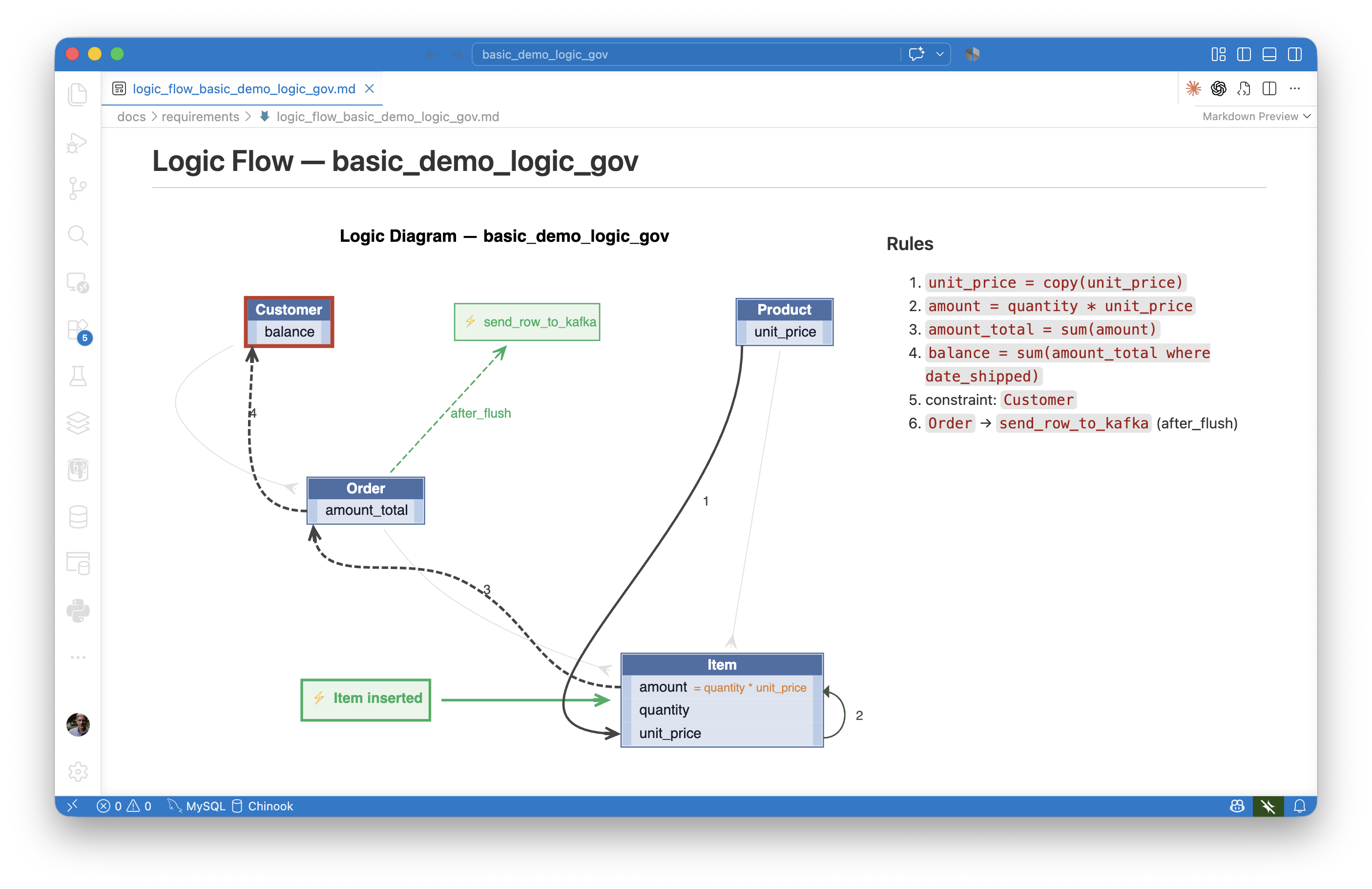
Say create logic diagram (or create logic diagram from <requirement>) in any
project. The AI generates a Markdown document that combines:
- The requirement — the natural-language spec from the logic file's module docstring
- The diagram — an SVG showing which tables are involved and how data flows
- The rule summary — a numbered list of what fires, in causal order
Logic Flow — demo_customs_clvs_2 [clvs_eligibility]

  Requirements:

    Scenario: Shipment at or below the LVS threshold is eligible
      Given a shipment imported by an authorized CLVS courier
      And the shipment has an estimated value not exceeding CAD $3,300
      ...

  [SVG diagram rendered inline]

  Rules:

    1. prohibited_commodity_count = count(ShipmentCommodity where is_prohibited)
    2. controlled_commodity_count = count(ShipmentCommodity where controlled_regulated_goods_id)
    3. clvs_reason = _clvs_reason(row) — comma-delimited list of ineligibility reasons
    4. clvs_eligible = _clvs_eligible(row) — 1 if all CLVS criteria met, else 0
The diagram uses left-side arrows for aggregation flow (copy, sum, count) and right-side arcs for formula derivations — visually separating hierarchy flow from local computation.
Output location: docs/requirements/<requirement>/logic_flow_<requirement>.md
Requires: brew install graphviz once on macOS (sudo apt install graphviz on Linux).
The calling= Docstring Convention
For complex rules using calling=my_func, the function must have a one-line docstring.
The first line appears in the logic flow summary:
def _clvs_eligible(row, old_row, logic_row):
    """Derive clvs_eligible: 1 if shipment meets all CLVS criteria, else 0."""
    ...
Without it, the summary shows only the function name. With it:
clvs_eligible = _clvs_eligible(row) — "1 if shipment meets all CLVS criteria"
Vital Signs flags missing docstrings as a finding (see below).
Vital Signs — Code Quality and Rule Correctness
Say vital signs (or health check) in any project workspace. The AI:
- Reads all logic files in
logic/logic_discovery/andlogic/declare_logic.py - Reads
database/models.pyto count domain tables - Computes two scores and checks for red flags
- Reports findings with exact file:line citations
- Offers to fix each finding in the same session
No configuration required. Zero overhead until invoked.
Coverage Score — Are your tables governed by rules?
Rules are weighted by their value — how much procedural code they replace:
| Rule type | Weight | Why |
|---|---|---|
Rule.sum |
3 | Replaces multi-path aggregate on every change path |
Rule.count |
3 | Same — existence checks, cardinality constraints |
Rule.formula |
2 | Replaces derivation on every write path |
Rule.copy |
2 | Replaces copy + cascade on parent change |
Rule.constraint |
1 | Replaces one guard — trivial to write procedurally |
Reference ranges:
| Score | Grade | Meaning |
|---|---|---|
| ≥ 4.0 | ✅ Strong | Well-governed; meaningful rules on most tables |
| 2.0–3.9 | 🟡 Moderate | Some tables likely ungoverned |
| 1.0–1.9 | 🟠 Thin | Mostly constraints; low rule density |
| < 1.0 | 🔴 Weak | Project largely procedural |
Integrity Score — Is the rule code correct?
Demerits penalize patterns that look like rules but silently fail — broken dependency tracking, procedural aggregates replacing rules, and hygiene issues that cause the AI to generate wrong rules on the next iteration.
Key demerits:
| Pattern | Points | Why |
|---|---|---|
session.query() inside a formula |
-3 | Goes stale on child changes — use Rule.count |
as_expression=lambda row: my_func(row) |
-2 | LB sees no row.attr refs — rule never re-fires |
Event assigns row.attr = with no I/O |
-2 | Should be Rule.formula or Rule.copy |
Rules in declare_logic.py (not discovery) |
-2 | Traceability lost — migrate to logic_discovery/ |
calling= function missing docstring |
-1 | Logic flow diagram shows no intent |
Hall passes exempt legitimately procedural code: Kafka publish functions, EAI consumer bridges, AI handler functions (OpenAI/Anthropic calls), and Allocate recipients functions.
Reference ranges:
| Score | Grade |
|---|---|
| ≥ 95 | ✅ Good |
| 85–94 | 🟡 Fair — some findings to address |
| 75–84 | 🟠 Poor — likely bugs in production logic |
| < 75 | 🔴 Critical — immediate remediation needed |
Red Flag — The Governance Signal
Beyond the two scores, the health check raises a binary red flag:
≥ 10 tables with incoming foreign keys AND zero
Rule.sum+ zeroRule.count
This is the primary signal for a team that has not adopted rules. Not a low score — none. A project with 10+ tables and no aggregation rules has almost certainly written those derivations procedurally, or not at all.
🚨 RED FLAG: 12 tables with child relationships, zero aggregation rules.
   Suggestion: schedule rules training or consulting engagement.
If the flag applies but is intentional (schema locked, read-only reporting project,
legacy integration), acknowledge it formally in logic/logic_discovery/use_case.py:
"""
@health-check: red-flag-suppress
Reason: schema locked — aggregations implemented in stored procedures
Reviewer: val
Date: 2026-05-10
"""
Reason: is required. The acknowledgement appears in the report with the reviewer's
name and date — a permanent audit trail.
Behave Tests — Correctness Proof
Behave tests provide the third layer: executable proof that the system does what the requirements specify. Unlike unit tests that verify code, Behave Logic Reports trace the full chain:
Each test scenario produces a log showing exactly which rules fired, what values changed, and what constraints were checked — making the connection between business requirement and system behaviour explicit and reviewable.
See Behave Logic Report for the complete guide.
Background: The Versata Automation Analyzer
The Vital Signs capability is inspired by a tool built at Versata in the 1990s — the Automation Analyzer. Versata generated Java superclasses for business rules; the analyzer measured the ratio of generated (declarative) code to hand-written (procedural) code across teams and projects.
The findings were striking. Across Fortune 500 deployments with tens to hundreds of thousands of lines of code:
- High-automation projects: 98% declarative
- Low-automation projects: 94% declarative
The gap — just 4 percentage points — represented thousands of lines of procedural code that bypassed the rules engine, with corresponding maintenance costs and production bugs. Teams that resisted rules didn't avoid all rules — they avoided the hardest ones: multi-table aggregations (sums, counts) that require trusting the engine to handle all change paths automatically.
The analyzer made that resistance visible. Managers could spot a struggling team in seconds, without reading code.
GenAI-Logic's governance tools extend that vision: not just measuring adoption, but providing the full traceable story from requirement to verified correctness.
Sample Vital Signs Report
Project Governance Report

Coverage Score: 5.8  (29 weighted rules / 5 tables)   ✅ Strong
Integrity Score: 98  (1 demerit, 0 reviewed)
Red Flag: none  (3 aggregation rules, 5 FK tables)

────────────────────────────────────────
COVERAGE DETAIL
  Tables (5): CustomsEntry, SurtaxLineItem, HsCodeRate, Province, CountryOrigin
  Rules:  3× sum, 6× formula, 6× copy, 2× constraint

INTEGRITY FINDINGS
  🟡 -1  logic/logic_discovery/cbsa_surtax/validation.py:8
         docstring contains implementation note beyond requirement text
         → Fix: replace with verbatim requirement text only

────────────────────────────────────────
1 finding needs attention. Want me to fix it?
The nw_sample Contrast — See It In Action
The Manager workspace includes two Northwind projects that tell the before/after story concretely. Open these files now to see what a real health check report looks like:
Before — samples/nw_sample_nocust/nw_sample_nocust_governance_report.md
Freshly created from the Northwind database. No rules added. This is what every
project looks like on day one:
- Coverage: 0.0 — Red Flag: 🚨 raised (16 FK tables, zero aggregations)
- Integrity: 100 (vacuously — nothing to demerit yet)
After — samples/nw_sample/nw_sample_governance_report.md
Same schema, rules added. This is what the project looks like after a developer
has worked through the logic:
- Coverage: 3.8 — Red Flag: none
- Integrity: 96 — 3 minor organizational findings, no bugs
The jump from 0.0 → 3.8 coverage and 🚨 → no flag is the value of rule adoption made visible in two numbers.
Try it yourself
Open samples/nw_sample/ as a workspace and say vital signs.
You will get a live report equivalent to nw_sample_governance_report.md —
plus the offer to fix each finding in the same session.
Governance Across the Portfolio
For organizations running multiple GenAI-Logic projects, health check scores provide a natural basis for tracking rule adoption across teams.
Ask the AI to score all projects at once:
This produces a ranked summary table — a leaderboard that makes rule adoption visible and comparable without reading a single line of code.
Why this works as an adoption tool:
- The score is actionable in an afternoon — one
Rule.sumdeclaration visibly moves the number - The red flag creates urgency without a mandate — no team wants to be the only 🚨 on the board
- Peer learning replaces enforcement — "how did Team A get to 5.8?" is a better conversation than "you must use more rules"
- The
@health-checkacknowledgement requires a name and reason — suppressing a flag to game the leaderboard is visible to management
Trend tracking matters more than absolute scores. A project at 2.0 trending up is healthier than one at 4.0 trending down. Run health checks after each significant release and track direction.
For full governance policy, score thresholds, and manager roll-up guidance,
see docs/training/governance.md in any created project.
Technical Reference
| File | Purpose |
|---|---|
docs/training/health_check.md |
AI instructions — scoring algorithm, detection patterns, fix protocol |
docs/training/governance.md |
Human policy — thresholds, red flags, portfolio view, Versata baseline |
docs/training/logic_diagrams/logic_diagram.md |
Logic flow diagram guide — how to read, how to generate |
docs/training/logic_diagrams/generate_logic_diagram.py |
Per-project convenience script |
system/ApiLogicServer-Internal-Dev/logic_diagram_gv.py |
Generator (Manager tool) |
samples/portfolio_governance_report.md |
Cross-project health check for all Manager samples |
samples/nw_sample/nw_sample_governance_report.md |
Single-project example (with rules) |
samples/nw_sample_nocust/nw_sample_nocust_governance_report.md |
Single-project example (baseline) |