XR EAI
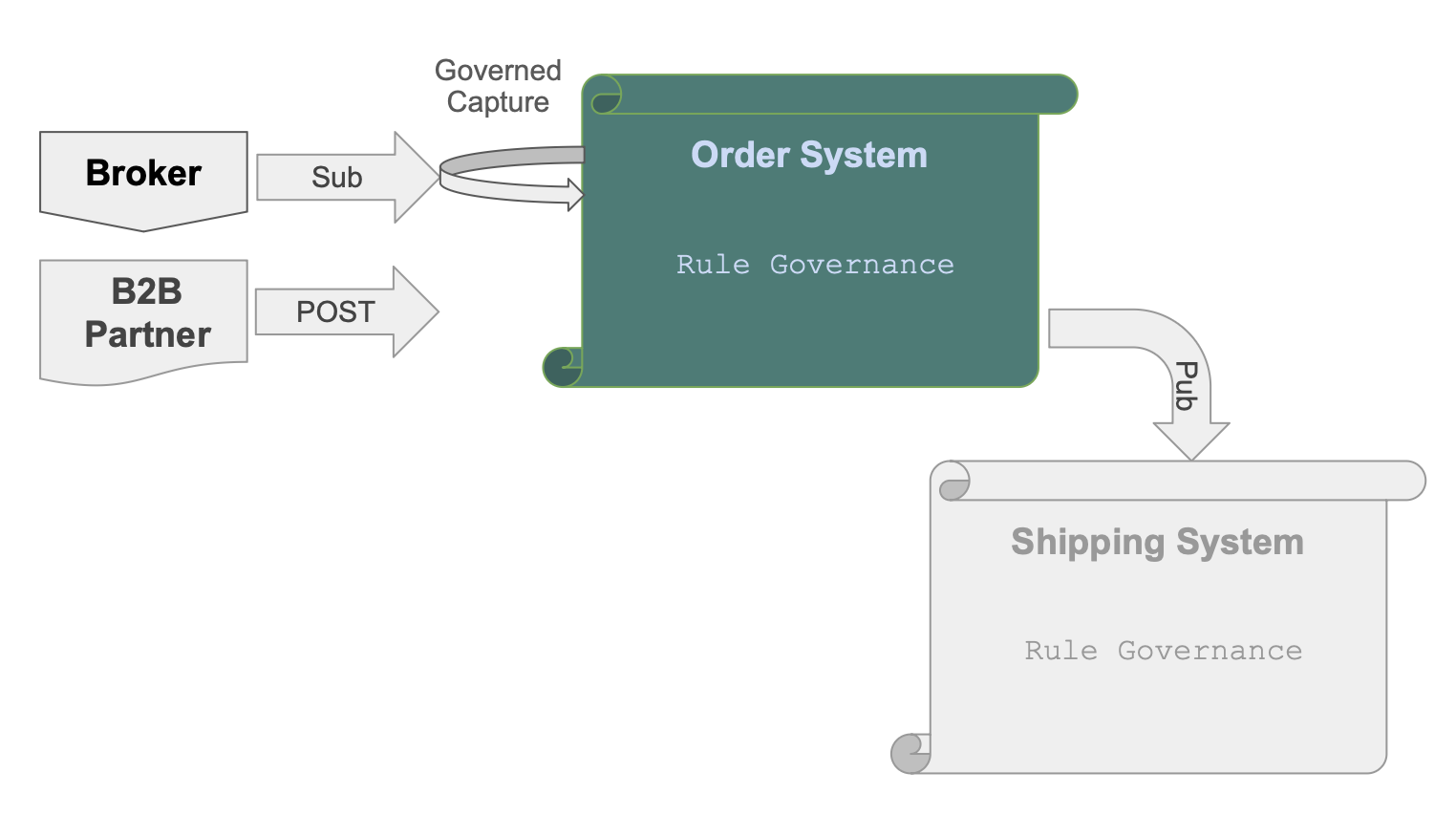
Order-EAI Requirements
1. Business Logic — Check Credit
Feature: Check Credit

  Scenario: Place an order
    Given a customer with a credit limit
    When an order is placed
    Then copy the price from the product
    And multiply by quantity to get the item amount
    And sum item amounts to get the order total
    And sum unpaid order totals to get the customer balance
    And reject if balance exceeds the credit limit
2. B2B API — Accept orders from external partners
Feature: B2B Order Integration

  Scenario: Accept order from external partner
    Given an inbound B2B order in partner format (message_formats/order_b2b.json)
    When the order is received via a Custom API endpoint named OrderB2B
    Then map Account to Customer by name
    And map Items.Name to Product by name
    And map Items.QuantityOrdered to Item.quantity
    And create the order with all Check Credit rules enforced
3. Kafka Subscribe — Inbound orders from sales channel
Feature: Kafka Subscribe Order Integration

  Scenario: Accept inbound orders from sales channel
    Given an inbound order message in JSON format (message_formats/order_b2b.json)
    When the message is received from Kafka topic order_b2b
    Then use the 2-message pattern
    And save the raw payload as a blob in the first transaction
    And parse and persist the order in the second transaction
    And map Account to Customer by name
    And map Items.Name to Product by name
    And map Items.QuantityOrdered to Item.quantity
    And create the order with all Check Credit rules enforced
4. Kafka Publish — Notify shipping on dispatch
Feature: Kafka Publish Shipping Notification

  Scenario: Notify shipping when an order is dispatched
    Given an Order exists
    When date_shipped is set
    Then publish to Kafka topic order_shipping
    And use message_formats/order_shipping.json as the message shape
    And use by-example publish rather than key-only publish
5. Test
- Docker is optional: add these to `config/default.env':
APILOGICPROJECT_KAFKA_CONSUMER = {"bootstrap.servers": "localhost:9092", "group.id": "demo-eai-order-group"}
APILOGICPROJECT_KAFKA_PRODUCER = {"bootstrap.servers": "localhost:9092"}
-
start Docker:
demo_eai_exec_reqmts % docker compose -f integration/kafka/dockercompose_start_kafka.yml up -d -
test order: curl "http://localhost:5656/consume_debug/order_b2b?file=docs/requirements/Order-EAI/message_formats/order_b2b.json"